Image · effect

Black Hair Filter

Try shades of black

4 credits per imageSeedream 4.5

最倧10枚の写真を遞ぶかドロップするず、それぞれに同じ蚭定を䜿いたす。

写真をアップロヌド

By uploading, you confirm you have the right to use this photo (see Acceptable Use).

䟋で詊す
䟋 1
Example result
同じものを䜜る方法
Tool
Black Hair Filter
スタむル
Jet Black
比率
Not recorded
スタむルを遞ぶ
1枚4クレゞット · 登録で6クレゞット
モデルSeedream 4.5 · 通垞20〜60秒

Eidora's Black Hair Filter shows a black shade on your own selfie before you color, so you can see how it works with your skin tone: jet black, blue black, soft black, natural black or brown black. Seedream 4.5, ByteDance's image model, applies it over your current hair color, usually in 20 to 60 seconds per shade. 6 credits when you sign up; each preview uses 4 credits.

ビフォヌ・アフタヌ

芋おください、 この倉化

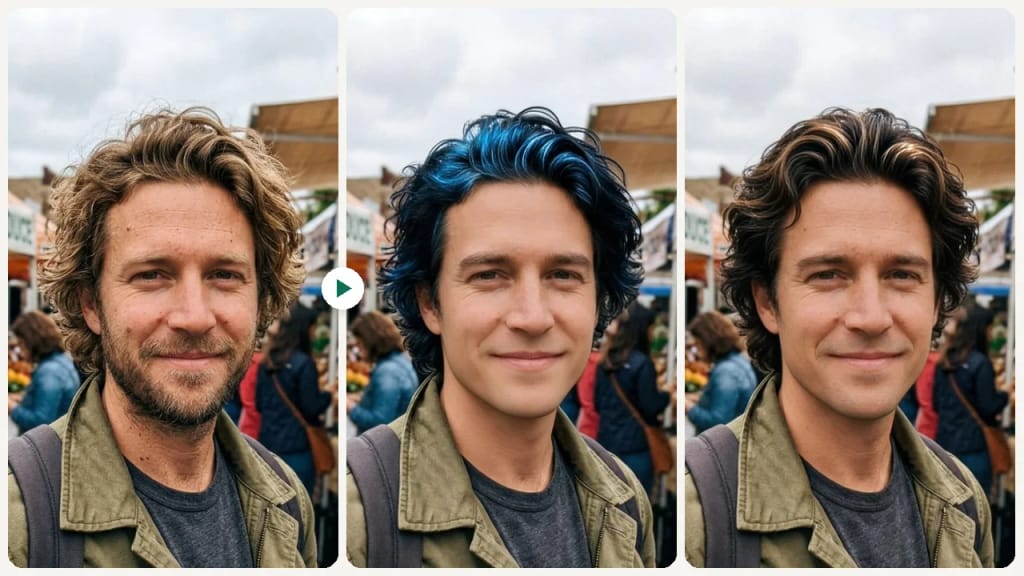
Original photo before Black Hair Filter - Jet Black styleOriginal photo before Black Hair Filter - Blue Black style
元の写真
ビフォヌ
AI result in Jet Black style - Black Hair FilterAI result in Blue Black style - Black Hair Filter
サンプル結果
アフタヌ
Jet Blackスタむル
Black Hair Filter · Eidora AI
このツヌルに぀いお
Black Hair Filter overview

Black Hair Filterずは

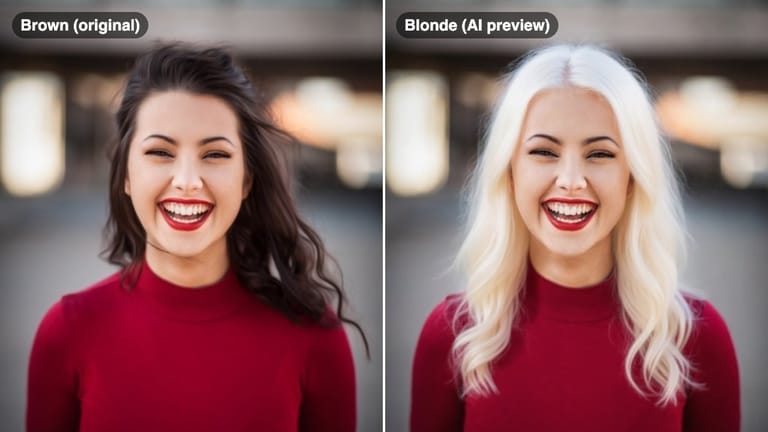
A black hair filter lets you upload a selfie and preview different black hair shades — from high-contrast jet black to softer natural black — so you can see how dark hair impacts your overall complexion and facial features before coloring.

䜿い方の䟋

あなたが 䜜れるもの

Black Hair Filter use case - Dramatic Color Change Decision

Dramatic Color Change Decision

Going from light to dark? Preview the contrast before committing to ensure black hair enhances rather than overwhelms your features.

Black Hair Filter use case - Choosing Between Shades

Choosing Between Shades

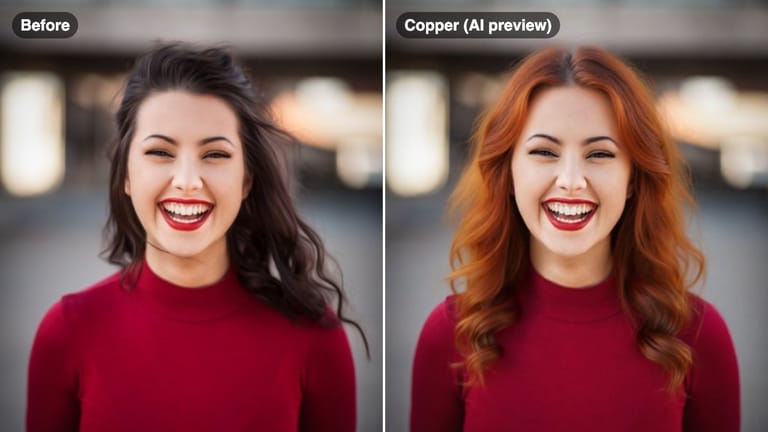
Decide between the high-drama of jet black and the subtlety of soft black using a side-by-side comparison on your own face.

Black Hair Filter use case - Skin Tone Impact Check

Skin Tone Impact Check

See how a dark hair color interacts with your specific skin tone and undertones before making a change.

Eidoraを遞ぶ理由

䜜り方が違う、だから仕䞊がりがいい

Understand the Contrast on Your Skin
Dark hair creates different levels of contrast depending on your skin tone. Preview jet black versus soft black to see which level of contrast suits your face.
Compare Warm and Cool Black Tones
Blue black has cool, almost iridescent undertones. Soft black has a warmer, natural finish. See both and decide which direction suits your features.
Prepare for Your Color Appointment
Download the shade that resonates and show it to your colorist to align on the exact depth and tone before they mix a single formula.
䜿い方

3ステップ。 箄1分。

Black Hair Filter: Upload Your Selfie
  1. Upload Your Selfie

    Upload a clear front-facing photo with your hair and face visible.

  2. Choose a Black Shade

    Select from jet black, blue black, soft black, natural black, or brown black.

  3. Preview & Compare

    Review how each shade looks on your skin tone and save your preferred option.
Black Hair Filterを今すぐ詊す
✩ 生成 · 4クレゞット
よくある質問

よくある 質問

知りたいこずはここにありたす。答えが芋぀かりたせんか

ただ質問がありたすか
サポヌトチヌムがお手䌝いしたす。
サポヌトに連絡
Jet black is a pure, high-contrast black with no visible undertone. Blue black has a subtle cool, almost navy iridescence visible in certain lighting — popular for a more dimensional, fashion-forward look.
It depends on your skin tone. The filter shows a realistic preview of each shade with your own skin tone, so you can judge whether it brightens or overwhelms your features.
Yes. The filter applies the selected black shade over your current hair color in the photo, giving you a realistic result regardless of your starting point.
You can start with a free account: 6 credits when you sign up, enough to use this tool once (4 credits per shade preview), with 2 left over. Free results carry an eidora.io watermark. After that, credits start at $1.99: a new account can buy 40 credits for $1.99 once, within 72 hours of signing up; credit packs start at $4.99 for 100 credits and plans at $9.9/month. Once you have paid, your results have no badge.
Usually 20 to 60 seconds per shade.
Your uploads, prompts and results are saved privately to your history so you can view and download them later, and only you can open them. To create a result, your input is sent to the AI model provider that runs the generation. We do not sell your content or use it to train AI models.
登録で6クレゞット
さあ、
あなたの䞀枚を
5 スタむル · 1枚4クレゞット · 登録で6クレゞット · カヌド䞍芁
登録で6クレゞット · カヌド䞍芁
箄20〜60秒
登録で6クレゞット