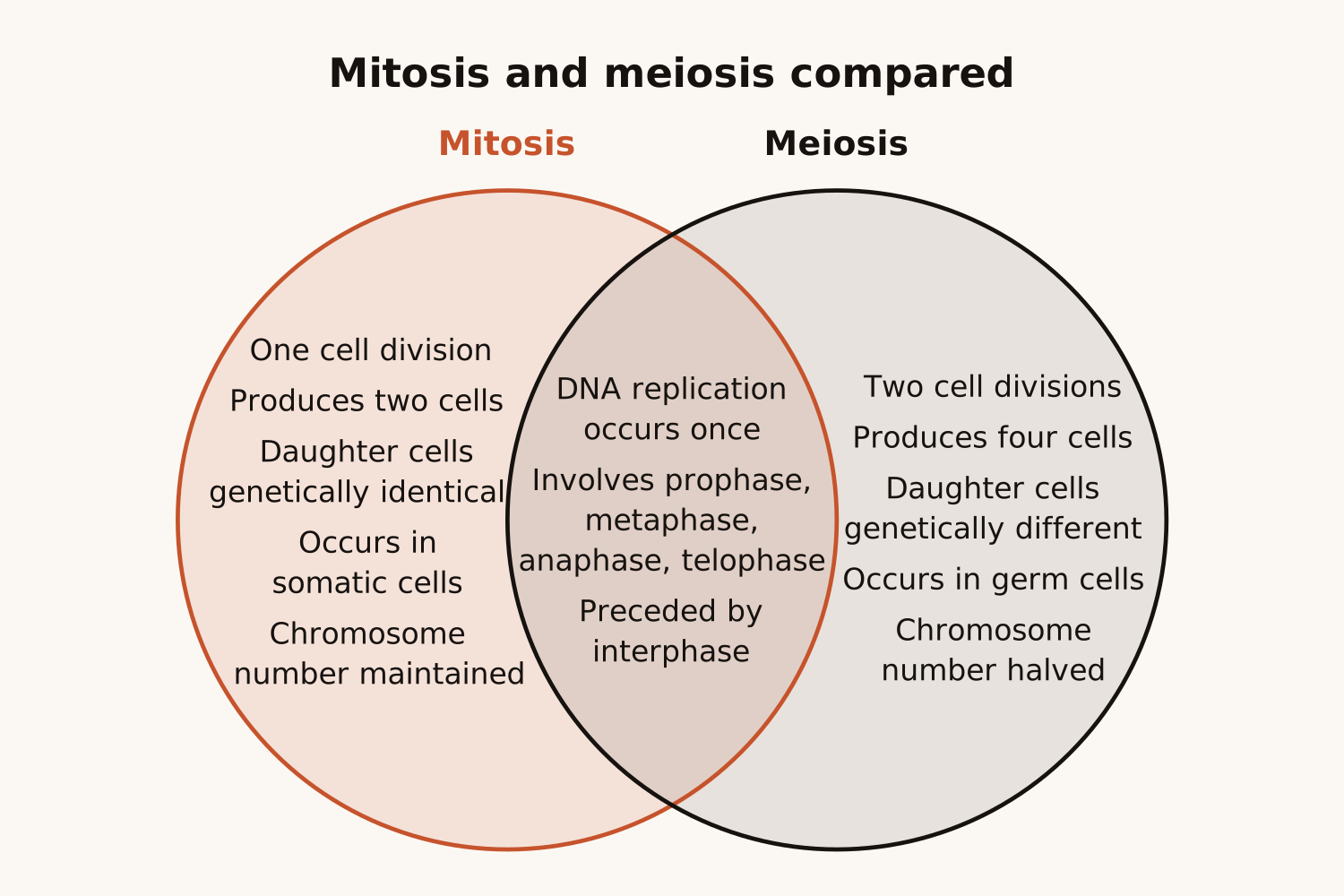
Type two or three things to compare, or paste your lists, and AI draws a Venn diagram: what each one has alone in its own circle, and what they share where the circles overlap.
<30s
per Venn diagram
0
circles to resize
2–3
circles per diagram
PNG SVG
plus Mermaid code
1
free try; sign up free to download
What Is This
A Venn diagram, drawn from a topic or your lists
A Venn diagram shows how groups overlap: each group is a circle, and whatever two groups share sits where their circles overlap. Teachers use it for compare-and-contrast lessons ("frogs and toads", "mitosis and meiosis"), and anyone can use it to see at a glance what two or three things have in common and what sets them apart.
Here you name the things to compare, or paste the lists you want sorted. AI fills every region: what only one has, what two share and, with three circles, what all three share. The circles grow to fit the words, so nothing spills over a line. From your lists it sorts exactly the members you give; from a topic alone it keeps to well-established facts.
Name the two things your assignment compares and get the differences on each side and the similarities in the middle, ready to check against your notes and write up.
Venn Diagram Maker
Lesson plan → Topic to a worksheet
Plants, animals and fungi…
A three-circle Venn diagram
Teachers
Type the topic of the lesson and get a Venn diagram to show in class, print as a worksheet, or blank out for students to fill in.
Venn Diagram Maker
Lists → Who is in which group
Paste two or three lists…
Every name in its region
Work & clubs
Paste who signed up for what, which customers bought which products, or which tools each team uses, and see who is in both at a glance.
How It Works
Type. Generate. Compare.
01
Name what to compare
Two or three things, a topic, or the lists to sort, in your own language.
02
AI draws the Venn diagram
AI puts every item in exactly one region and sizes the circles to fit, in under 30 seconds.
03
Download or keep editing
Download PNG or SVG for slides and worksheets, or copy the Mermaid code to change any word yourself.
Why Eidora
Built for clear comparisons
Every item in its place
Each item sits in exactly one region: what only one has, what two share, what all three share. An empty overlap stays empty instead of being filled with a made-up similarity.
Your lists, sorted exactly
Paste the members of each group and every one lands in the region of exactly the groups it is listed in, in your words, with nothing added.
Words that fit the circles
The circles grow to fit what is written in them, so every word stays inside its region and clear of the lines, in the PNG and the SVG alike.
A Venn diagram draws each group as a circle and overlaps the circles, so whatever two groups share sits where their circles overlap, and what only one group has sits in the rest of its circle. With three circles, the middle holds what all three share.
Type the two or three things you want to compare, such as "Compare mitosis and meiosis", or paste your lists, and press Generate. The Venn diagram appears in under 30 seconds, ready to download as PNG or SVG.
Yes. Eidora’s AI decides what goes in each region, and the circles are drawn to fit the words, so you get a finished diagram instead of empty circles to fill and resize.
Yes. Write each group’s members, for example "Chess club: Ava, Ben, Chloe" and "Drama club: Chloe, Emma". Every member goes in the region of exactly the groups it is listed in (Chloe in the overlap), in your words, with nothing added.
You get the Venn diagram a teacher would draw for it: with two circles, 3 to 6 items in each region; with three, 2 to 4 in each circle alone and 1 to 3 in each overlap, using only well-established facts. Check it against your course or source before you hand it in.
Two or three. Name three things and you get three circles with all seven regions. If you name more than three, the first three are drawn: for four or more groups, a table or a few separate Venn diagrams are easier to read.
Up to 10 in each region of a two-circle diagram. With three circles, up to 7 in a circle alone and 4 in each overlap. When a list is longer, the last line of the region says how many more there are, so nothing is left out silently.
Then the overlap stays empty. The AI is told never to invent a similarity to fill it, so an empty middle means the groups you gave have nothing in common.
Yes. Write your topic or lists in your language, and the circle names and items come back in the same language, Chinese included.
Yes. Change your text and generate again, or copy the Mermaid code, change any word and paste it into the Mermaid Live Editor or any tool that runs a recent version of Mermaid (11.14 or later), which draws Venn diagrams from it.
PNG for slides, worksheets and documents, SVG for scalable graphics, and Mermaid code for editing the diagram as text.
Permitted uses depend on your input rights, applicable law, and the selected third-party model or provider terms. Verify those terms before publishing course materials or client deliverables.
Not to try it. You can make one diagram a day without an account and see the result. To download the Venn diagram or copy the Mermaid code, sign up free: a free account gets 16 credits to start and 4 free credits every day, and each diagram uses 4 credits. Without an account, Eidora’s diagram tools share that one diagram a day. Download the diagram when it is ready; it is not saved to your history.
Two things, one picture
Name what to compare. Get the Venn diagram.
Free to try · Topics or lists · PNG, SVG or Mermaid