Image · effect

Red Hair Filter

Try copper, auburn, ginger

4 credits per imageSeedream 4.5

Selecione ou solte até 10 fotos para usar as mesmas opções em cada uma.

Envie sua foto

By uploading, you confirm you have the right to use this photo (see Acceptable Use).

Experimente com um exemplo:
Exemplo 1
Example result
Como fazer um assim
Tool
Red Hair Filter
Estilo
Copper
Formato
Not recorded
Escolha o estilo
4 créditos por imagem · 6 créditos ao se cadastrar
Modelo: Seedream 4.5 · Normalmente 20-60 segundos

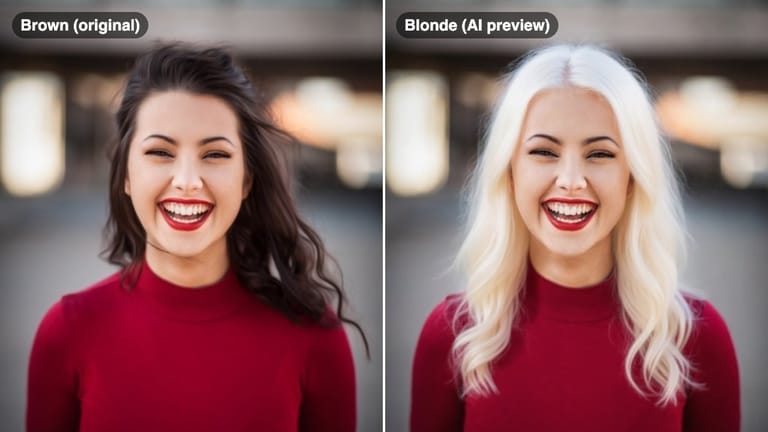
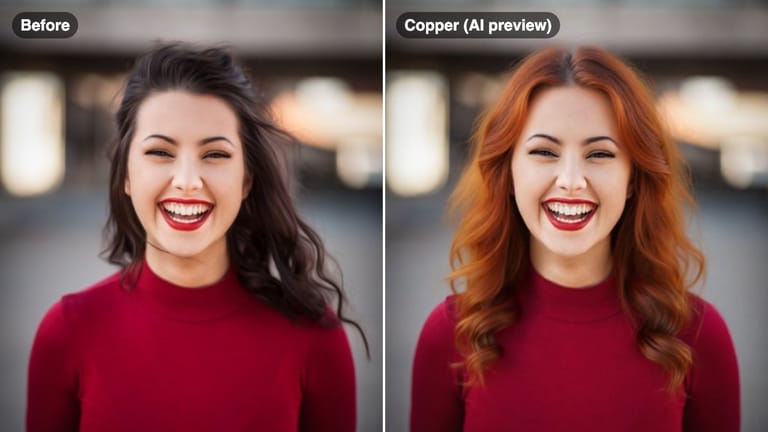
Eidora's Red Hair Filter shows a red shade on your own selfie before you dye: copper, auburn, burgundy, cherry red or ginger, whatever your current hair color. Seedream 4.5, ByteDance's image model, makes each preview, usually in 20 to 60 seconds per shade. 6 credits when you sign up; each preview uses 4 credits.

Antes e depois

Veja a transformação

Original photo before Red Hair Filter - Copper styleOriginal photo before Red Hair Filter - Auburn style
Foto original
Antes
AI result in Copper style - Red Hair FilterAI result in Auburn style - Red Hair Filter
Resultado de exemplo
Depois
Estilo Copper
Red Hair Filter · Eidora AI
O que é esta ferramenta
Red Hair Filter overview

O que é Red Hair Filter?

A red hair filter lets you preview warm and bold red hair tones — from earthy auburn and ginger to vivid cherry red — on your own selfie, so you can see whether the color complements your skin and eye color before making a dramatic change.

Casos de uso

O que você pode criar

Red Hair Filter use case - Pre-Coloring Shade Selection

Pre-Coloring Shade Selection

Decide between copper, auburn, or cherry red before booking your color appointment.

Red Hair Filter use case - Fall and Winter Color Planning

Fall and Winter Color Planning

Explore warm auburn and burgundy tones as a seasonal color change heading into autumn.

Red Hair Filter use case - Skin Tone Compatibility Check

Skin Tone Compatibility Check

See which red tone works with your undertones — warm copper for warm skin, cool burgundy for cool skin.

Por que o Eidora

Feito diferente, feito melhor

Red Can Go Wrong — Preview First
Red hair reacts strongly with skin tone. Warm copper flatters some complexions, while cool burgundy suits others. Preview before you commit.
Find Your Intensity Level
From subtle auburn and ginger to bold cherry red and burgundy — see the full intensity range and decide how dramatic your change should be.
Share a Before-and-After
Make a before-and-after preview in under a minute and ask friends which red they like.
Como funciona

Três passos. Cerca de um minuto.

Red Hair Filter: Upload Your Selfie
  1. Upload Your Selfie

    Upload a clear front-facing photo with your hair visible.

  2. Pick a Red Shade

    Choose from copper, auburn, burgundy, cherry red, or ginger.

  3. Preview & Decide

    Compare your red options and save or share the best result.

Experimente Red Hair Filter agora
✦ Gerar · 4 créditos
Perguntas frequentes

Perguntas frequentes

Tudo o que você precisa saber. Não encontrou o que procura?
Ainda tem dúvidas?
Nossa equipe de suporte terá prazer em ajudar.
Falar com o suporte
Red dye fades faster than other hair colors because red molecules are larger and wash out more quickly. Previewing the shade first helps you decide if the maintenance commitment is worth it.
Auburn is a rich, dark red-brown tone with less orange. Copper is a brighter, warmer red-orange shade. Both are flattering but suit different complexions.
Yes. The filter shows how each red shade would appear on your photo regardless of your current hair color, giving you a realistic transformation preview.
You can start with a free account: 6 credits when you sign up, enough to use this tool once (4 credits per shade preview), with 2 left over. Free results carry an eidora.io watermark. After that, credits start at $1.99: a new account can buy 40 credits for $1.99 once, within 72 hours of signing up; credit packs start at $4.99 for 100 credits and plans at $9.9/month. Once you have paid, your results have no badge.
Usually 20 to 60 seconds per shade.
Your uploads, prompts and results are saved privately to your history so you can view and download them later, and only you can open them. To create a result, your input is sent to the AI model provider that runs the generation. We do not sell your content or use it to train AI models.
6 créditos ao se cadastrar
Pronto para fazer
o seu?
5 estilos · 4 créditos por imagem · 6 créditos ao se cadastrar · sem cartão
6 créditos ao se cadastrar · sem cartão
~20–60 segundos
6 créditos ao se cadastrar