Selecciona o suelta hasta 10 fotos para usar las mismas opciones en cada una.
By uploading, you confirm you have the right to use this photo (see Acceptable Use).

Cómo hacer uno así
- Tool
- AI Photo Enhancer
- Proporción
- Not recorded
Modelo: ESRGAN · Normalmente 5-20 segundos
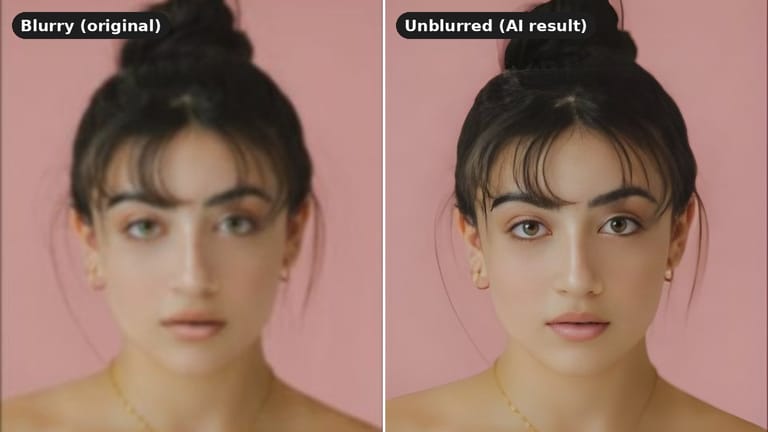
Eidora's AI Photo Enhancer enlarges a small or soft photo to 2x its width and height with ESRGAN, an AI upscaling model, and sharpens faces along the way, usually in 5 to 20 seconds; colors, contrast and heavy blur stay as they are. 6 credits when you sign up; each photo uses 1 credit.
Mira la transformación



¿Qué es AI Photo Enhancer?
Upload a small, soft or slightly pixelated photo, such as a phone shot, a downloaded image or a scan of an old print, and the AI Photo Enhancer enlarges it to twice its width and height with ESRGAN, an AI upscaling model, adding extra detail to faces along the way. Colors, contrast, heavy blur and damage stay as they are; for faded or scratched prints, use the AI Old Photo Restoration tool. Each photo uses 1 credit and usually takes 5 to 20 seconds.
Lo que puedes crear

Upscale Old Family Photos
Family archivists can upscale small or soft scans of old photos so details and faces look sharper. It does not bring back faded colors or repair scratches; for that, use the AI Old Photo Restoration tool.
Enhance E-commerce Product Shots
Product photos taken with a phone often come out small or a little soft. Enlarging and sharpening them makes listings look cleaner and more trustworthy. Lighting and colors stay as they were.
Refine Social Media Content
Social media users frequently capture photos quickly on their phones, leading to less-than-perfect lighting or slight blurriness. This tool quickly refines image quality, ensuring their posts look polished and professional, capturing more attention and engagement from their audience.
Hecho distinto, hecho mejor
Tres pasos. Más o menos un minuto.

Upload Your Photo
Upload the photo. JPG, PNG or WebP up to 10MB; a clear, well-lit photo works best.
AI Enhances Automatically
Press Generate. The photo is enlarged 2x and sharpened, usually in 5 to 20 seconds.
Download Enhanced Image
Preview the improved photo and download the high-quality version back to your computer.
Preguntas frecuentes
Todo lo que necesitas saber. ¿No encuentras lo que buscas?
También te puede gustar
 Edit
 Edit
 Edit
 Edit
 Edit
 Edit
el tuyo?