Image · effect

Buzz Cut Filter

Preview a buzz cut or fade

4 credits per imageFLUX.1 Kontext Pro

اختر أو أفلت حتى 10 صور لاستخدام الخيارات نفسها على كل منها.

ارفع صورتك

By uploading, you confirm you have the right to use this photo (see Acceptable Use).

جرّب بمثال:
مثال 1
Example result
كيف تصنع مثل هذا
Tool
Buzz Cut Filter
النمط
Buzz Cut
الشكل
Not recorded
اختر النمط
4 نقطة لكل صورة · 6 نقطة عند التسجيل
النموذج: FLUX.1 Kontext Pro · عادةً 10-30 ثانية

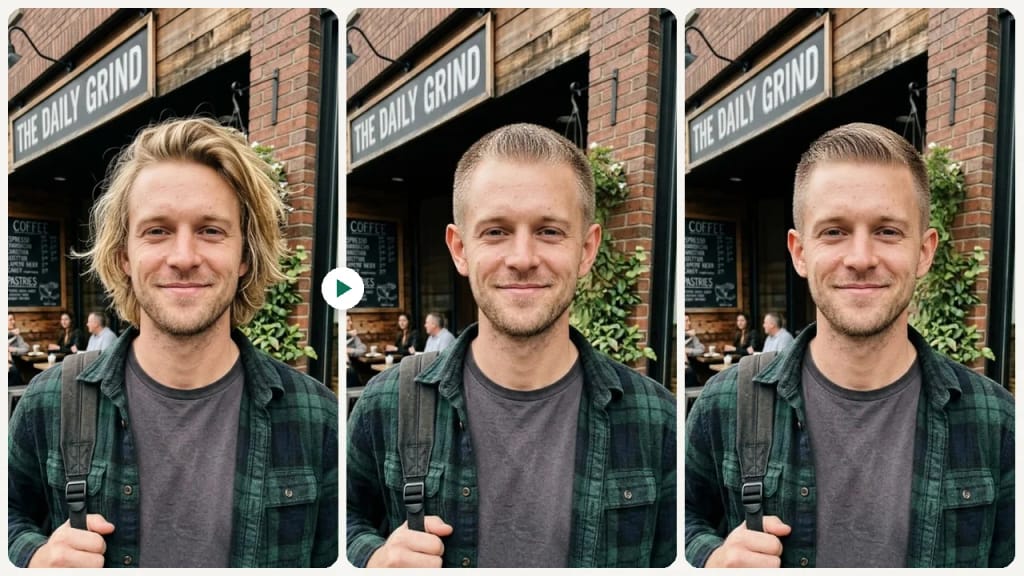
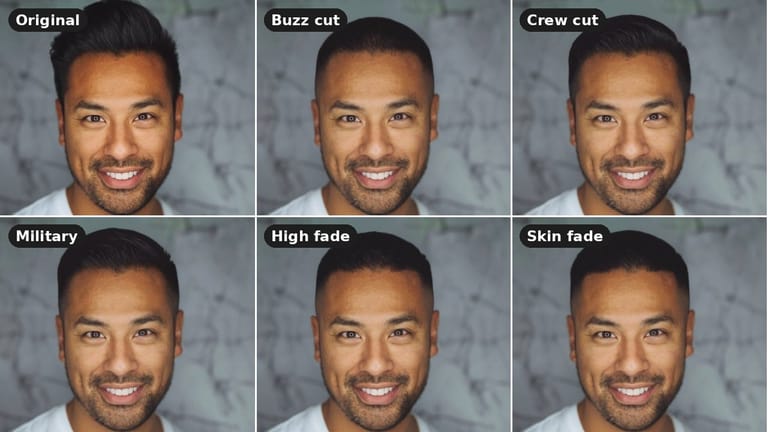
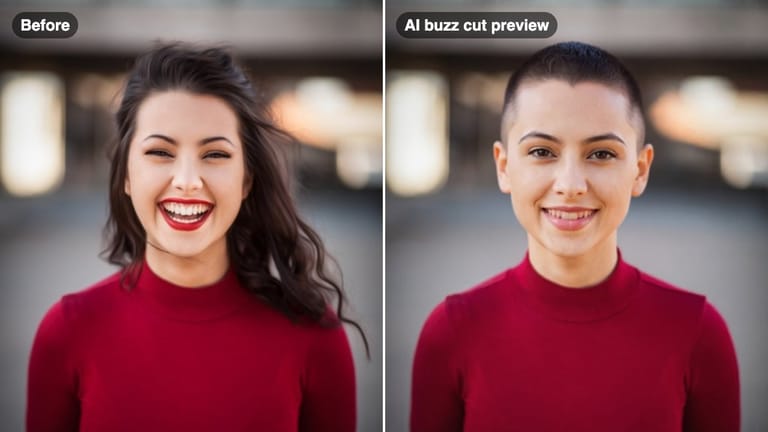
Eidora's Buzz Cut Filter shows a short cut on your own selfie before you shave, with 5 cuts: Buzz Cut, Crew Cut, High Fade, Skin Fade and Military. FLUX.1 Kontext Pro, Black Forest Labs' image-editing model, redraws only the hair on your head and keeps your face, skin tone and natural hair color, usually in 10 to 30 seconds per preview. 6 credits when you sign up; each preview uses 4 credits.

قبل وبعد

شاهد التحوّل

Original photo before Buzz Cut Filter - Buzz Cut styleOriginal photo before Buzz Cut Filter - Military style
الصورة الأصلية
قبل
AI result in Buzz Cut style - Buzz Cut FilterAI result in Military style - Buzz Cut Filter
نتيجة نموذجية
بعد
نمط Buzz Cut
Buzz Cut Filter · Eidora AI
ما هذه الأداة
Buzz Cut Filter overview

ما هو Buzz Cut Filter؟

A buzz cut filter lets you upload a selfie and preview how a buzzed or closely shaved hairstyle looks on your face shape — before you make a drastic cut you can't easily undo.

حالات الاستخدام

ما يمكنك صنعه

Buzz Cut Filter use case - Before a Major Style Change

Before a Major Style Change

Test the buzz cut look before committing to a cut that takes months to grow back.
Buzz Cut Filter use case - Military or Job Requirement

Military or Job Requirement

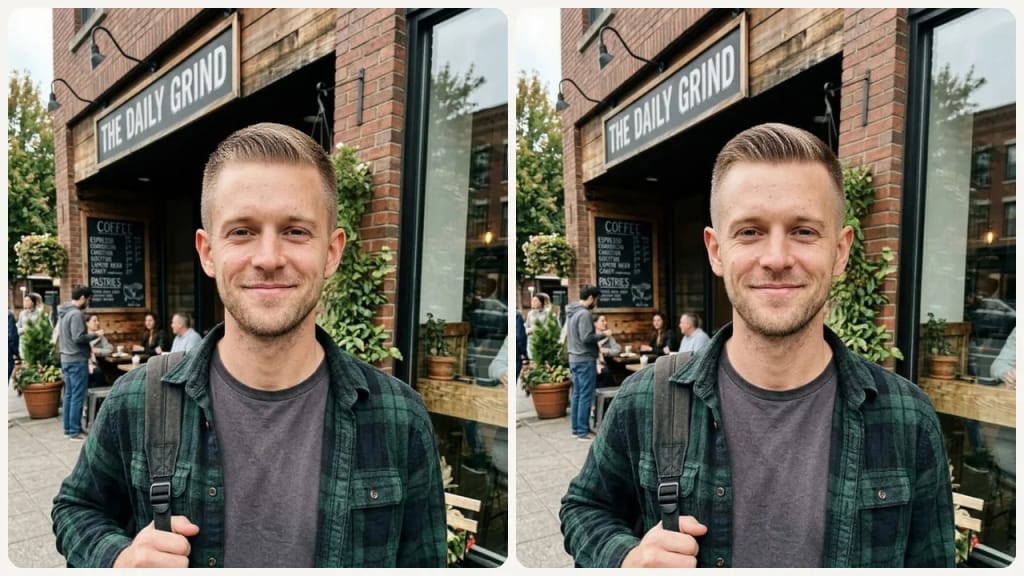
Preview a regulation military cut or clean fade before a job starts requiring short hair.

Buzz Cut Filter use case - Hot Weather Decision

Hot Weather Decision

Considering going short for summer? See the result before making a seasonal chop.

لماذا Eidora

مصنوع بشكل مختلف، ونتيجته أفضل

Avoid a Drastic Regret
A buzz cut is one of the hardest haircuts to grow back from quickly. Seeing the result first means you decide calmly, not impulsively.
Check How Your Face Shape Handles It
Buzz cuts expose your head shape entirely. Preview helps you understand how your face and skull proportions look with minimal hair.
Compare Fade Variations
Not all buzz cuts look the same. A high fade and a skin fade create very different effects — compare them side by side before deciding.
كيف يعمل

ثلاث خطوات. نحو دقيقة.

Buzz Cut Filter: Upload Your Photo
  1. Upload Your Photo

    Upload a clear front-facing selfie with good lighting.

  2. Select a Cut Style

    Choose from buzz cut, crew cut, high fade, military, or skin fade.

  3. Review & Save

    Preview the result, compare options, and save the look you like.

جرّب Buzz Cut Filter الآن
✦ إنشاء · 4 نقطة
الأسئلة الشائعة

الأسئلة الشائعة

كل ما تحتاج معرفته. لم تجد ما تبحث عنه؟
هل لديك أسئلة أخرى؟
يسعد فريق الدعم بمساعدتك.
تواصل مع الدعم
Upload a selfie and pick a cut, and FLUX.1 Kontext, an image-editing model from Black Forest Labs, redraws only the hair on your head. Your face, skin tone, clothing, pose and background stay the same, and your natural hair color is kept.
Five: Buzz Cut (one very short length all over), Crew Cut (a short top of about 1.5 to 2.5 cm with tapered sides), High Fade, Skin Fade and Military. The two fades keep short hair on top while the sides fade down to bare skin, so you can try a look that is short without being fully buzzed. You can also switch to Custom to add your own details to the selected cut.
It shows the cut on your own face and head and keeps your face, skin tone and expression. With most of the hair gone, the shape of your scalp is the AI's best estimate, so treat the result as a preview rather than an exact match.
A clear front-facing selfie with even lighting and no hat works best. The AI needs a good view of your full face and hairline.
Usually 10 to 30 seconds per preview.
You can start with a free account: 6 credits when you sign up, enough to use this tool once (4 credits per preview), with 2 left over. Free results carry an eidora.io watermark. After that, credits start at $1.99: a new account can buy 40 credits for $1.99 once, within 72 hours of signing up; credit packs start at $4.99 for 100 credits and plans at $9.9/month. Once you have paid, your results have no badge.
Your uploads, prompts and results are saved privately to your history so you can view and download them later, and only you can open them. To create a result, your input is sent to the AI model provider that runs the generation. We do not sell your content or use it to train AI models.
You must have the necessary rights to the original photo. Permitted uses of the result also depend on applicable law and the selected third-party model or provider terms.
It changes the haircut only: it does not change your hair color, beard or face, and it can't match an exact clipper guard number. Each run makes one image, so to compare cuts, generate them one after another.
6 نقطة عند التسجيل
مستعد لصنع
نسختك؟
5 أنماط · 4 نقطة لكل صورة · 6 نقطة عند التسجيل · دون بطاقة
6 نقطة عند التسجيل · دون بطاقة
نحو 10–30 ثانية
6 نقطة عند التسجيل