Video · effect

AI Video Enhancer

Upscale a clip 2×

35 credits per videoByteDance Video Upscaler

ارفع الفيديو

By uploading, you confirm you have the right to use this video (see Acceptable Use).

معاينة النتيجة
يتم التحسين على الخادم ويتطلب خطة مدفوعة أو باقة نقاط.
35 نقطة لكل فيديو · يتطلب باقة نقاط (من $1.99)
النموذج: ByteDance Video Upscaler · تستغرق الفيديوهات عادةً 2-5 دقيقة

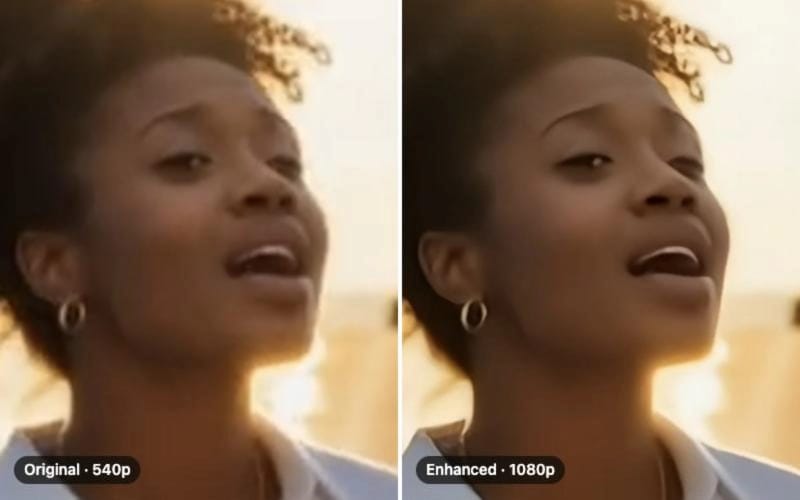
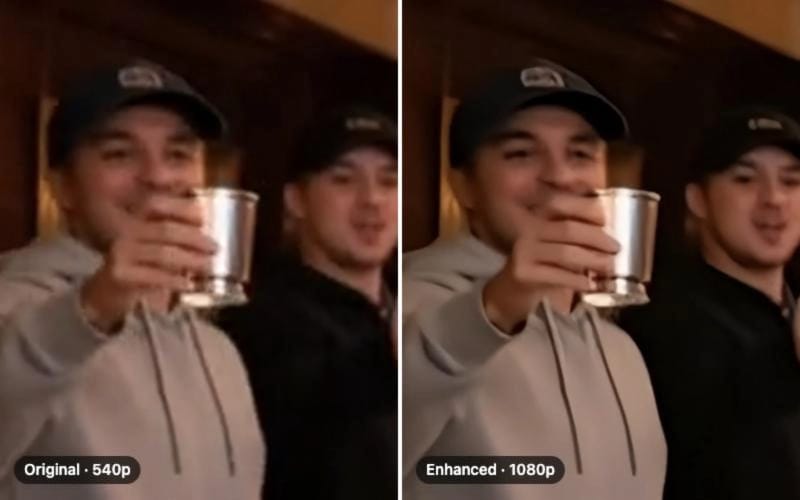
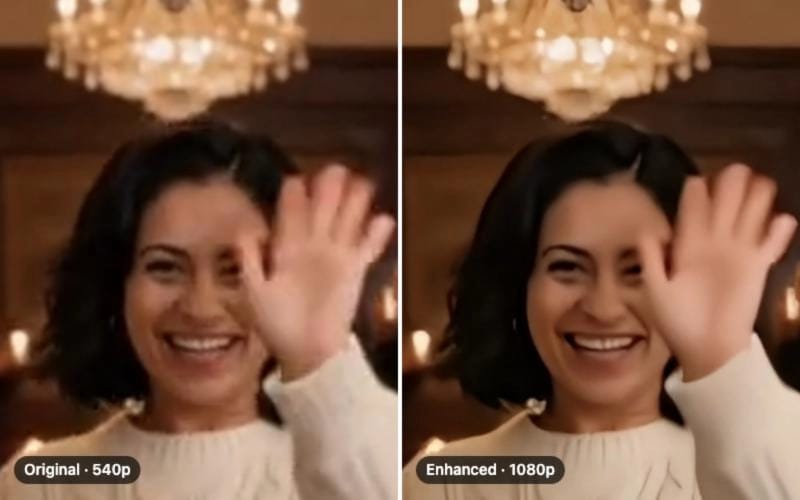
Eidora's AI Video Enhancer runs ByteDance's video upscaler to double the width and height of a clip of up to 10 seconds: a 720p clip comes back at 1440p and a 1080p clip in 4K, with sharper detail, less noise and fewer compression blocks, usually in 2 to 5 minutes. It does not adjust color or lighting. It needs a paid plan or a credit pack; each video uses 35 credits.

قبل وبعد

شاهد التحوّل

A 540×960 clip of seven poses, and the same video after the AI Video Enhancer doubled it to 1080×1920: faces, hair and clothes are sharper (before)
الفيديو الأصلي
قبل
نتيجة نموذجية
بعد
ما هذه الأداة
AI Video Enhancer overview

ما هو AI Video Enhancer؟

AI Video Enhancer is a video-upscaling tool that increases a short clip’s resolution with sharper edges and fewer compression artifacts.

Eidora's AI Video Enhancer runs ByteDance's video upscaler (BytePlus video enhancement, through fal.ai) to double the width and height of your clip. Upload a 720p phone recording and get back a 1440p version with sharper edges and fewer compression artifacts; a 1080p clip comes back in 4K. Clips above 30 frames per second come back at 30. Processing happens on our servers: you upload, wait about 2 to 5 minutes, and download the enhanced MP4. No GPU required on your end.

حالات الاستخدام

ما يمكنك صنعه

AI Video Enhancer use case - Restore Old Family Videos

Restore Old Family Videos

Many families have cherished home videos that have degraded over time, losing their sharpness. This tool upscales a short clip to twice its resolution, making those precious moments clearer for future generations to enjoy.

Enhance Vlogs for Social Media

Content creators often record videos in varied conditions, leading to less-than-perfect footage for platforms like YouTube or TikTok. Improve the clarity and visual appeal of your vlogs and short clips, ensuring your content always looks professional and engaging.

Upgrade Business Promotion Videos

Small businesses need their promotional videos and product demonstrations to look polished without a large budget for professional videography. Use this tool to clean up existing marketing videos, making them sharper and more appealing to potential customers.

لماذا Eidora

مصنوع بشكل مختلف، ونتيجته أفضل

2x Resolution Upscale
The ByteDance upscaler doubles the width and height of every frame: a 720p clip becomes 1440p with sharper edges, not just a stretched picture.
Built for Real Phone Footage
The upscaler is designed for everyday problems such as noise, compression blocks and low resolution in phone and web videos.
Server-Side Processing
No local GPU needed. Upload your clip, processing runs on our infrastructure, and you download the enhanced MP4 when it's ready.
كيف يعمل

ثلاث خطوات. نحو دقيقة.

AI Video Enhancer: Upload Your Video
  1. Upload Your Video

    Upload a short video clip. A short clip works best.

  2. Start Enhancement

    Initiate the enhancement process and our AI will automatically analyze and improve your video's quality.

  3. Download Enhanced Clip

    Once processing is complete, preview your improved video and download the high-quality version to your device.

جرّب AI Video Enhancer الآن
✦ ابدأ الآن
الأسئلة الشائعة

الأسئلة الشائعة

كل ما تحتاج معرفته. لم تجد ما تبحث عنه؟
هل لديك أسئلة أخرى؟
يسعد فريق الدعم بمساعدتك.
تواصل مع الدعم
You can enhance a wide range of videos, including old home movies, phone footage, drone clips, vlog content, and more. The tool is designed to address common issues like blur, noise, compression blocks and low resolution. It does not correct poor lighting or faded color.
Video enhancing is included in paid plans: Pro is $9.9/month for 300 credits, and each video uses 35 credits. Ultra and Max add more credits, or you can buy a one-time credit pack.
Our AI Video Enhancer supports popular video formats such as MP4, MOV, AVI, and WebM. We continuously work to expand our compatibility to ensure you can enhance nearly any video file you have.
Usually 2 to 5 minutes for a clip of up to 10 seconds; longer and sharper clips take longest. Keep the page open; the enhanced MP4 appears when it is ready.
This specific AI Video Enhancer focuses on visual improvements: higher resolution and sharper detail. While an enhanced video can feel more immersive, our current iteration does not directly process or improve audio quality. For audio enhancements, separate tools would be needed.
Yes, our AI Video Enhancer is web-based and optimized for use across various devices, including mobile phones and tablets. Simply access the tool through your device's web browser, upload your video, and initiate the enhancement process.
Expect a clip at twice the width and height (a 720p clip comes back at 1440p, a 1080p clip in 4K) with sharper detail, less noise and fewer compression blocks. Clips above 30 frames per second come back at 30. The enhancer does not adjust color, brightness or lighting, so dark footage stays dark.
Your uploads, prompts and results are saved privately to your history so you can view and download them later, and only you can open them. To create a result, your input is sent to the AI model provider that runs the generation. We do not sell your content or use it to train AI models.
Video uploads are supported up to 64MB. For best results, use MP4 format under 1080p resolution.
No. The AI Video Enhancer processes one video at a time, up to 10 seconds per clip.
It runs ByteDance's video upscaler, which rebuilds every frame at twice the width and height and cleans up noise and compression blocks along the way. It cannot recover detail the camera never captured, such as a face that is only a few pixels wide.
If your internet connection drops during the upload or processing phase, the process might be interrupted. For best results, ensure a stable internet connection. If an issue occurs, you may need to re-upload your video and restart the enhancement.
باقة البداية: 100 نقطة مقابل $4.99
مستعد لصنع
نسختك؟
35 نقطة لكل فيديو · خطط مدفوعة وباقات نقاط
خطط مدفوعة وباقات نقاط
نحو 2–5 دقائق
35 نقطة لكل فيديو