Image · effect

Bob Cut Filter

Try five kinds of bob

4 credits per imageFLUX.1 Kontext Pro

사진을 최대 10장까지 선택하거나 끌어다 놓으면 각각 같은 옵션을 적용합니다.

사진 업로드

By uploading, you confirm you have the right to use this photo (see Acceptable Use).

예시로 해 보기:
예시 1
Example result
같은 결과 만드는 방법
Tool
Bob Cut Filter
스타일
Classic Bob
비율
Not recorded
스타일 선택
이미지당 4크레딧 · 가입 시 6 크레딧
모델: FLUX.1 Kontext Pro · 보통 10~30초

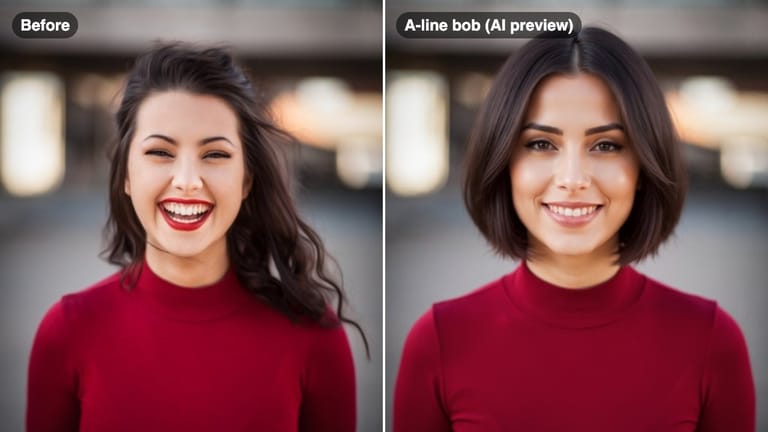
Eidora's Bob Cut Filter shows a bob on your own selfie before you book a haircut: classic, blunt, layered, French or A-line, even if your hair is long now. FLUX.1 Kontext Pro, Black Forest Labs' image-editing model, makes each preview, usually in 10 to 30 seconds per style. 6 credits when you sign up; each preview uses 4 credits.

전후 비교

확인해 보세요, 이 변화

Original photo before Bob Cut Filter - Classic Bob styleOriginal photo before Bob Cut Filter - Layered Bob style
원본 사진
전
AI result in Classic Bob style - Bob Cut FilterAI result in Layered Bob style - Bob Cut Filter
샘플 결과
후
Classic Bob 스타일
Bob Cut Filter · Eidora AI
이 도구 소개
Bob Cut Filter overview

Bob Cut Filter란?

A bob cut filter lets you upload a selfie and preview how different bobs (classic, blunt, layered, French or A-line) look on your face before you book your next haircut.

활용 사례

당신이 만들 수 있는 것

Bob Cut Filter use case - Pre-Salon Style Decision

Pre-Salon Style Decision

Confirm your bob style before your appointment so you and your stylist are completely aligned.

Bob Cut Filter use case - Length Comparison

Length Comparison

Compare a chin-length French bob against a longer layered bob to see which length suits you better.

Bob Cut Filter use case - Fresh Start After a Change

Fresh Start After a Change

Explore a bold new bob look after a big life change — graduation, breakup, or new job.

왜 Eidora인가

만드는 방식이 다르고, 결과가 더 좋습니다

Find the Right Bob for Your Face
A blunt bob looks different from a French bob. Test each variation on your actual face before committing to any length or cut.
See How Length Affects Your Look
Bob cuts vary from chin-length to jaw-length. Previewing helps you pick the length that best frames your features.
Arrive at the Salon Prepared
Download your preview and show it to your stylist so they know exactly what you have in mind.
이용 방법

세 단계, 약 1분.

Bob Cut Filter: Upload Your Selfie
  1. Upload Your Selfie

    Upload a clear front-facing photo with your hair and face visible.

  2. Choose a Bob Style

    Pick from classic, blunt, layered, French, or A-line bob styles.

  3. Preview & Download

    Review your bob cut preview and download the result to share with your stylist.
지금 Bob Cut Filter 써 보기
✦ 생성 · 4 크레딧
자주 묻는 질문

자주 묻는 질문

알아야 할 모든 것. 찾는 답이 없나요?

아직 궁금한 점이 있나요?
지원팀이 기꺼이 도와드립니다.
지원팀 문의
A classic bob typically sits at chin length with more volume, while a French bob is shorter — usually at the jaw or above — with a fuller, rounder shape often paired with bangs.
Yes. The AI previews the bob cut on your photo regardless of your current hair length, so you can see the transformation from long hair to a shorter bob.
Yes. You can run the filter multiple times with different bob styles and compare the results before your appointment.
You can start with a free account: 6 credits when you sign up, enough to use this tool once (4 credits per bob preview), with 2 left over. Free results carry an eidora.io watermark. After that, credits start at $1.99: a new account can buy 40 credits for $1.99 once, within 72 hours of signing up; credit packs start at $4.99 for 100 credits and plans at $9.9/month. Once you have paid, your results have no badge.
Usually 10 to 30 seconds per style.
Your uploads, prompts and results are saved privately to your history so you can view and download them later, and only you can open them. To create a result, your input is sent to the AI model provider that runs the generation. We do not sell your content or use it to train AI models.
가입 시 6 크레딧
만들 준비가
되셨나요?
5 스타일 · 이미지당 4크레딧 · 가입 시 6 크레딧 · 카드 필요 없음
가입 시 6 크레딧 · 카드 필요 없음
약 10~30초
가입 시 6 크레딧