Generate from Text
Quickly visualize concepts by typing a simple description, bringing your ideas to life instantly.
qwen image ai generator free online
Transform your ideas into unique images or modify existing ones with the Qwen Image AI generator, perfect for creators and marketers seeking distinctive visuals.
Use Qwen Image AI generator free online to create stunning visuals from text or edit existing images. Effortlessly bring your creative ideas to life.
Sample results
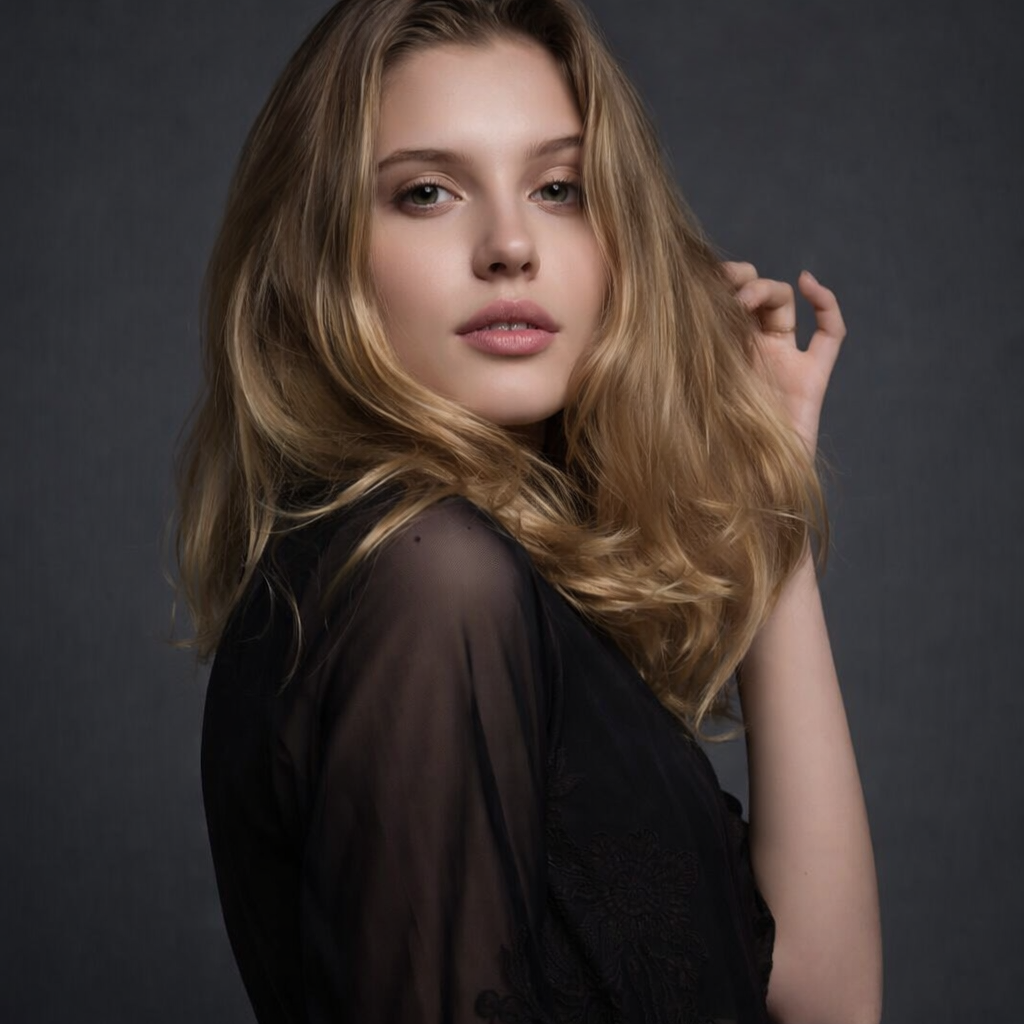
An everyday photo is refined using Qwen Image's text-guided editing. The model adjusts color grading, enhances fine details, and applies a cohesive visual style — all from a single text prompt. The original composition and identity are preserved while the overall aesthetic is elevated.
What can this tool do?
Qwen Image is an AI generator free online that helps you create or refine visual content effortlessly. Whether you're starting from a textual idea or want to enhance an existing photo, this qwen image ai generator provides the flexibility to achieve your vision. It's ideal for designers needing quick mockups, social media managers generating engaging posts, or anyone looking to visualize concepts without complex software. Upload an image to modify its style or elements, or simply type a description to generate a brand new scene. This tool streamlines the creative process, making high-quality image generation accessible to everyone.
Finding the perfect image that truly matches your vision can be a time-consuming struggle, often resulting in bland visuals or hours spent learning intricate design software. Relying on limited stock photo libraries rarely captures the unique essence of your message, leaving your content looking uninspired.
Why choose this tool?
Quickly visualize concepts by typing a simple description, bringing your ideas to life instantly.
Upload your photos and guide Qwen Image to alter elements, styles, or compositions with text prompts.
Maintain artistic direction by combining your initial visual input with detailed text instructions for refined output.
Explore various aesthetic possibilities, from photorealistic to artistic, without needing specialized design skills.
Eliminate the need for complex editing software or lengthy manual design processes for visual content.
Create professional-looking images regardless of your design experience, making visual content creation inclusive.
How to use
Start by uploading an image you want to modify or type a detailed text prompt for a new creation.
Add specific text instructions to guide the Qwen Image generator on desired changes or stylistic preferences.
Review the generated image, make any further adjustments, and then download your unique visual.
Use cases
Content Creators can generate unique images for blog posts, articles, or marketing materials based purely on textual descriptions. Qwen Image allows you to visualize abstract concepts or specific scenes when no suitable stock photo exists.
E-commerce Sellers can upload existing product photos to enhance their quality, adjust lighting, or modify backgrounds. Qwen Image helps make product listings more professional and appealing without extensive manual editing.
Designers and Artists can quickly prototype visual ideas by either uploading a rough sketch or providing a detailed text prompt. Qwen Image assists in exploring various design directions and iterations efficiently for new projects.
FAQ
Qwen Image is an AI-powered tool designed to help users generate new images from text descriptions or modify existing images. It provides a flexible platform for creative expression, allowing for detailed adjustments or entirely new visual concepts. This tool simplifies the process of bringing visual ideas to life without requiring specialized design skills.
You can generate your first image without signing in. Signed-in Free users receive 6 generations per day and 180 monthly credits. Pro starts at $9.9/month with higher enforced limits and 30-day history.
You can create a wide range of images, from realistic scenes and product mockups to abstract art and stylized illustrations. Qwen Image's versatility allows it to interpret diverse textual prompts and visual inputs. This means you can generate visuals for social media, marketing materials, personal projects, and more.
Absolutely. Qwen Image allows you to upload your existing photos and then use text prompts to guide modifications. You can change backgrounds, alter elements, adjust styles, or even add new objects to your uploaded images. This feature provides a simple way to refine and customize your personal or professional visuals.
Qwen Image supports two primary input types: text prompts and image uploads. You can either type a detailed description of the image you want to create from scratch, or you can upload an image and then use text to describe how you want it to be modified. This dual input system offers maximum flexibility for your creative workflow.
Qwen Image is designed to interpret and respond to complex and detailed text prompts. Providing specific descriptions, including style, subject, colors, and mood, will help the AI generate a more accurate and nuanced image. Experimenting with different levels of detail can lead to surprising and high-quality results.
While Qwen Image aims to provide high-quality output, there might be practical limits on the initial upload size and the final generated resolution for optimal performance. Specific details on maximum dimensions or file sizes are usually provided within the tool's interface or help section. Generally, it produces images suitable for web and digital use.
Permitted uses depend on applicable law and Qwen Image's current model or provider terms. Eidora plans change generation limits and history retention but do not themselves grant additional intellectual-property rights.
Start now