how-to照片修复
如何让模糊图片变清晰:AI 能修复什么、不能修复什么
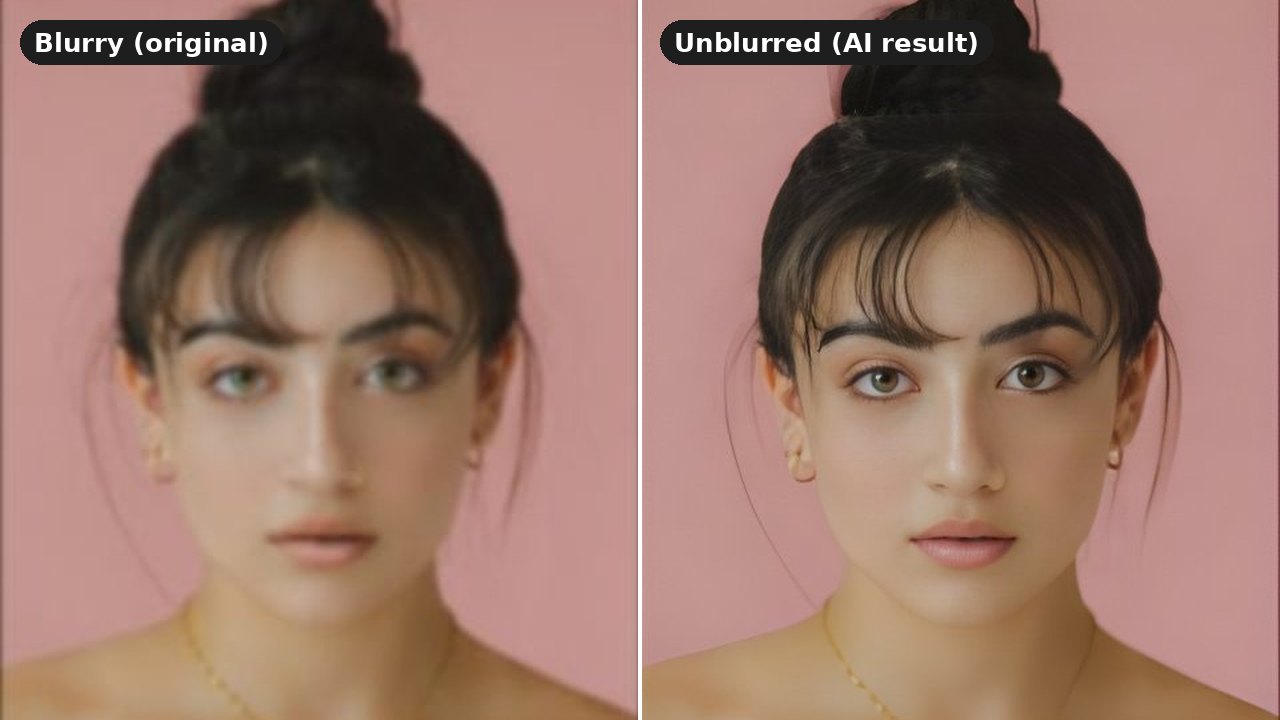
Almost everyone has a photo they love that came out blurry: a candid shot from a party, an old picture scanned from a print, a screenshot that got compressed one too many times. The good news is that modern AI can rescue a lot of these. The honest news is that it cannot rescue all of them, and knowing the difference saves you time.
In this guide you will learn what actually causes blur, which kinds AI deblurring handles well, where it fails, and how to unblur an image for free in about half a minute. The example above is a real result from Eidora's unblur tool, not a mockup.
用你自己的照片试试
选一张照片,然后点按钮。 工具页会打开,并直接用这张照片开始生成。
免费试用,出结果后再登录。
What Kind of Blur Do You Have?
"Blurry" covers several different problems, and they respond very differently to AI.
Soft focus. The camera focused slightly in front of or behind the subject, so edges look soft but shapes are still clear. This is the most common kind of blur in phone photos, and AI handles it well.
Low resolution or heavy compression. The photo is small, was resized, or was saved and shared many times, so it looks smeary and blocky when you zoom in. AI upscaling is built for exactly this and usually gives the biggest improvement.
Light camera shake. A slight wobble while taking the picture leaves faint double edges. Mild shake often improves; the AI sharpens edges and faces even if it cannot fully undo the movement.
Strong motion blur. The subject or the camera moved a lot, leaving long streaks. The original detail is smeared across the image, and no current tool can reliably put it back. You may get a sharper-looking picture, but details will be guessed rather than recovered.
Deliberate blur or pixelation. Faces, plates or text that someone blurred on purpose. The information is gone. Any tool that claims to reveal what was hidden is inventing it.
How AI Deblurring Works
Traditional sharpening only boosts contrast along edges, which is why over-sharpened photos get halos and grain. AI deblurring is different: the model has learned from millions of pairs of blurry and sharp images what fine detail usually looks like, and it redraws the image at a higher resolution with that detail added.
Eidora's unblur tool uses an AI upscaler that doubles the resolution of your photo, with a separate step that restores faces. That is why faces often come out with crisp eyes, lashes and hair even when the original was soft.
The trade-off is that the added detail is a well-informed guess. For a portrait or a landscape that is exactly what you want. For anything where the exact detail matters, such as small text, a license plate or evidence, treat the result as an enhanced picture, not as proof of what was there.
How to Unblur an Image Online for Free
Step 1: Start from the best original. Use the original file from your phone or camera, not a screenshot of it or a copy downloaded from a chat app. Every re-save adds compression.
Step 2: Crop to what matters. If only one face or object needs to be sharp, crop the photo around it first. The AI spends its effort on the area you care about.
Step 3: Upload and wait about half a minute. Open the AI unblur tool, upload your photo and wait for the result. You can try your first photo without signing in; a free account gets 6 generations a day.
Step 4: Compare at full size. Zoom in on eyes, hair and edges and compare with the original. Check that faces still look like the same person.
Step 5: Download the result. You download the full-resolution output, which is twice the width and height of what you uploaded.
When AI Unblurring Goes Wrong
AI deblurring is impressive, but it is worth knowing its failure modes so you can spot them.
Small details change. Look closely at the example at the top: the eyes in the blurry original read slightly greenish, and in the sharpened result they are clearly brown. The AI picked a plausible eye color because the real one was not recoverable. Hair strands, jewelry and patterns can shift the same way.
Text gets invented. Blurry letters may come back as different letters, or as text-like shapes that are not real words. For photos of documents, signs or screenshots, the AI text enhancer is a better fit because it is told to keep every character exactly as it is.
Heavy blur turns waxy. On strongly blurred photos the result can look smooth and plastic, especially skin. If that happens, the blur was beyond what can be recovered; a sharper original is the only real fix.
Running it twice makes it worse. Feeding an unblurred result back into the tool usually adds artifacts rather than detail. Run it once on the best original you have.
Quick Answers About Unblurring Images
Can I unblur an image for free? Yes. You can try one photo without signing in, and a free account gets 6 generations a day.
Can AI fix motion blur? Light camera shake often improves. Long motion streaks cannot be reliably reversed; the result may look sharper, but details will be guessed.
Can I unblur a blurred-out or pixelated part of an image? No. When something is deliberately blurred or pixelated, the original information is gone, and any tool that claims to reveal it is making it up.
What is the difference between deblurring and upscaling? Upscaling makes an image larger; deblurring makes it sharper. Modern AI tools do both at once, which is why a small, soft photo can come back larger and crisper.
Does it work on phone photos? Yes. The tool runs in your browser on any phone or computer, and phone photos with soft focus are one of the best cases for it.
Will the person still look like themselves? Usually, yes, because faces are restored with a dedicated step. Always compare with the original, since small details such as eye color can change on very blurry photos.
Try It on Your Own Photo
If the photo is soft, small or slightly shaky, there is a good chance AI can make it look sharp again. If it is heavily smeared or deliberately blurred, no tool can bring back what is not there, and knowing that saves you from chasing an impossible fix.
The fastest way to find out which case you have is to try it. Upload your photo to the AI unblur tool, compare the result with the original at full size, and keep it if it looks right.